 AMG Menu Coding
AMG Menu Coding - ELM327 — User Guide
Enable the hidden AMG menu on W204 / W212 clusters with your phone and an ELM327.
Get it on Google Play →What is AMG Menu Coding?
Many non-AMG W204 and W212 instrument clusters (IC_204) contain the AMG menu in their software, but it is switched off. AMG Menu Coding writes the bytes that enable it into the cluster EEPROM through the OBD socket. No laptop, Vediamo/DTS or Xentry required: an Android phone and a cheap ELM327 adapter are enough.
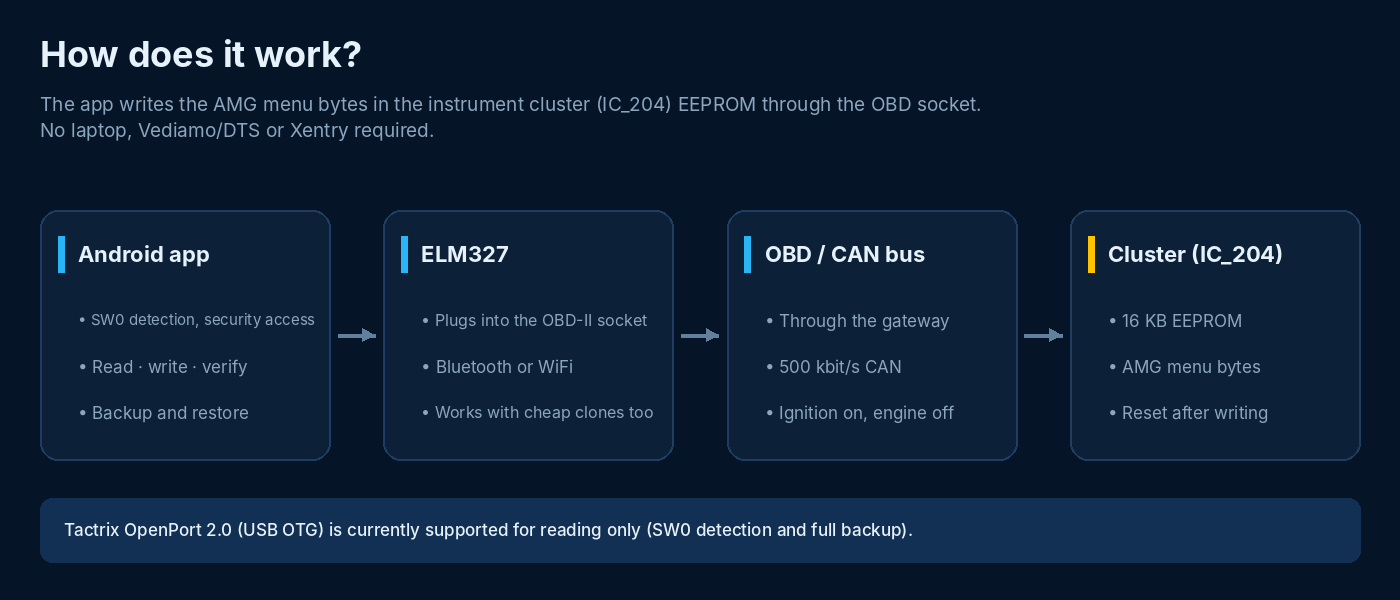
The app only touches the addresses it needs:
- Detects the cluster software number (SW0) and computes the correct security key (42 SW blocks supported)
- Backs up the complete cluster EEPROM (16 KB)
- Turns the AMG menu on or off; on some clusters fixes the CNG / pre-heat lamp that lights up after AMG activation
- Reads back and verifies every write, and restores the old value automatically on mismatch
- Restores the cluster from your own backup in case of a serious fault
Which pages appear in the menu depends on the cluster software.
What do you need?
- A W204 or W212 with an IC_204 cluster (with a supported SW0)
- An ELM327 adapter: Bluetooth or WiFi. Cheap clones work too; the app compensates for their limitations in software.
- An Android 7.0+ phone or tablet
- Ignition on, engine off, battery charged (a charger is recommended for long operations)
How to use: three steps
The buttons on the main screen unlock in order; you cannot skip a step.
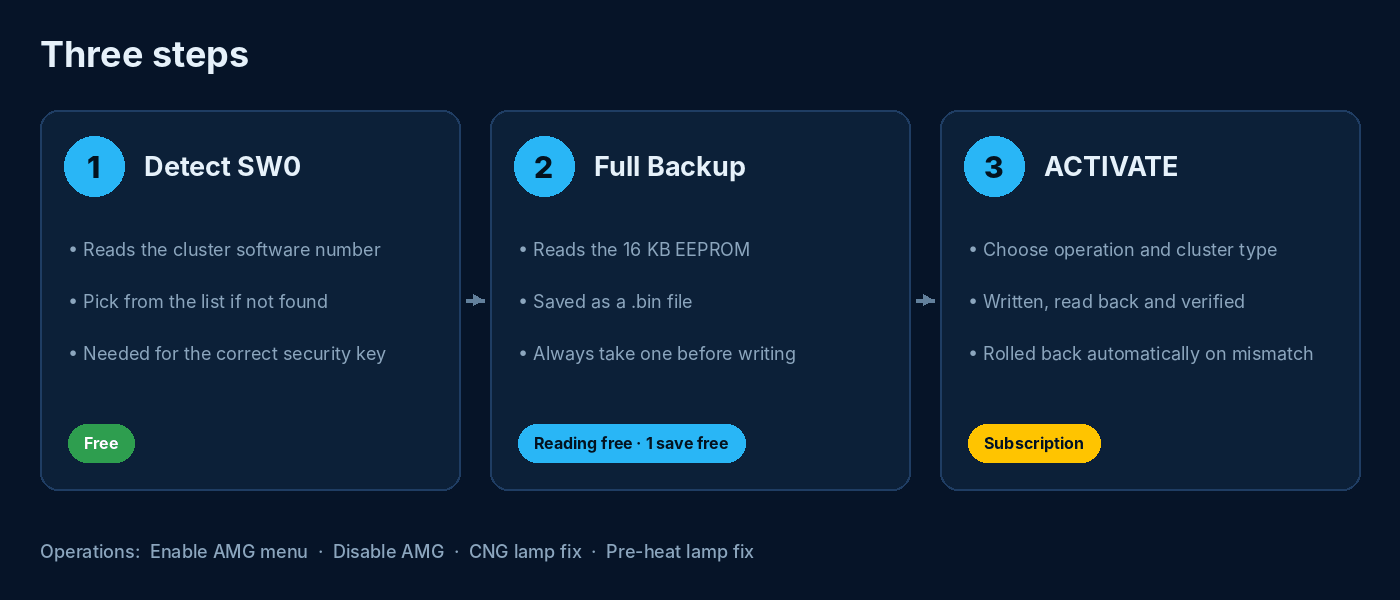
- Settings → Connection: pair the Bluetooth adapter in the phone’s Bluetooth menu first, then select it in the app. WiFi adapters usually use
192.168.0.10 : 35000. - 1 · Detect SW0: reads the cluster software number. If it is not found, check the SP0 number in the cluster’s hidden menu and pick it from the list. A wrong SW0 means a wrong key; the cluster rejects it but is not harmed.
- 2 · Full Backup: reads the 16 KB EEPROM and saves it as a
.binfile. Takes a few minutes. Always take a backup before writing. - 3 · ACTIVATE Selection: choose the operation (Enable AMG Menu, Disable AMG, CNG Lamp Fix, Pre-heat Lamp Fix) and, for AMG, the cluster type. The confirmation screen shows the value to be written. Once confirmed, the operation finishes in one go and the cluster restarts.
Choosing the cluster type
The value that enables the AMG menu depends on the cluster type: black-and-white (MONO) or colour (COLOR) display, 3 or 5 dials. In the app, the TYPE ? button next to the cluster type list opens this guide in your language.
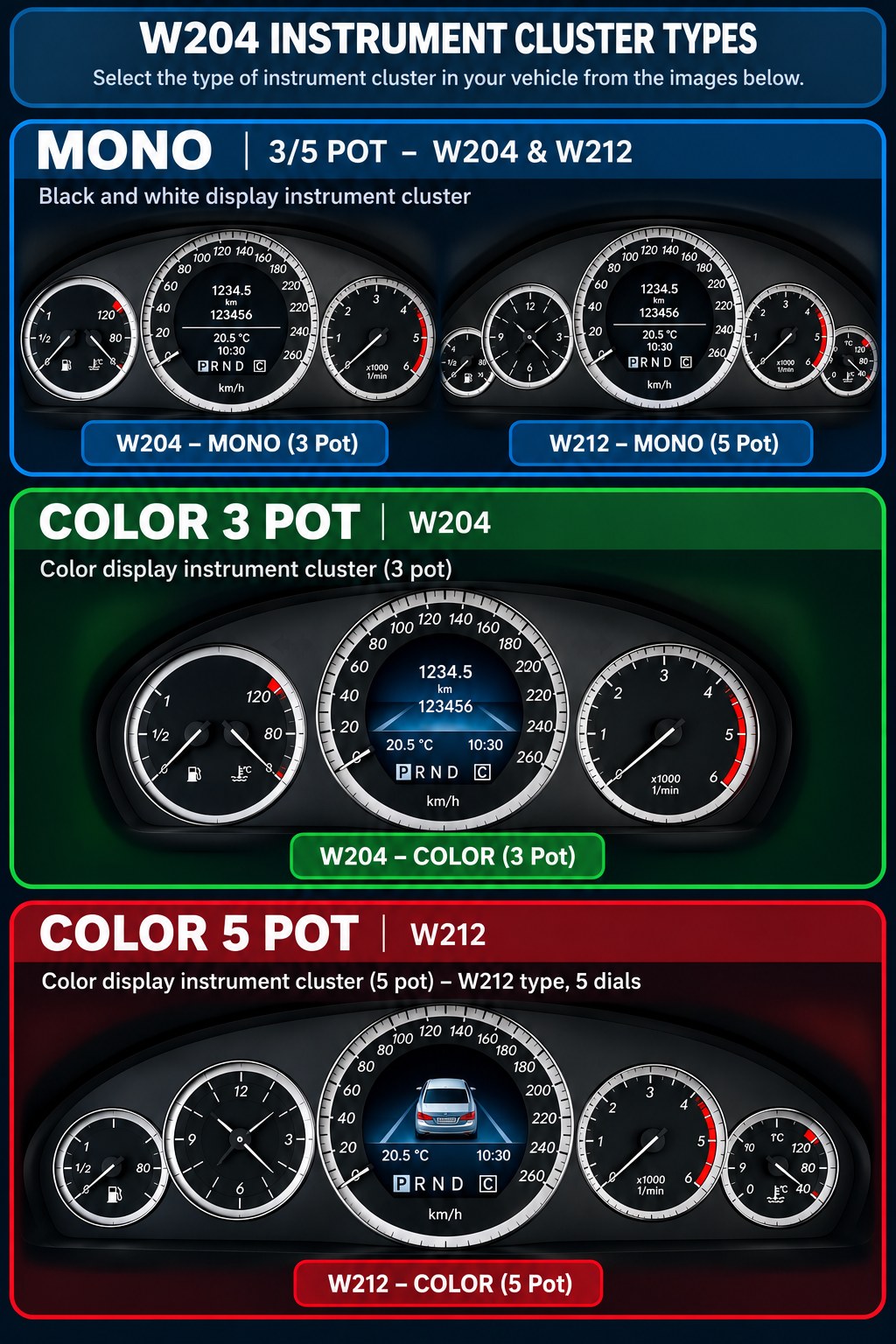
- Find the picture that looks most like your cluster and select the matching option in the list.
- If the menu does not appear, try the other option for the same type. Every write is verified and can be undone with Disable AMG.
- If the cluster contains an unrecognised value, the app writes nothing.
Safety
Our priority is that the cluster is never damaged. Every write follows the same rules:
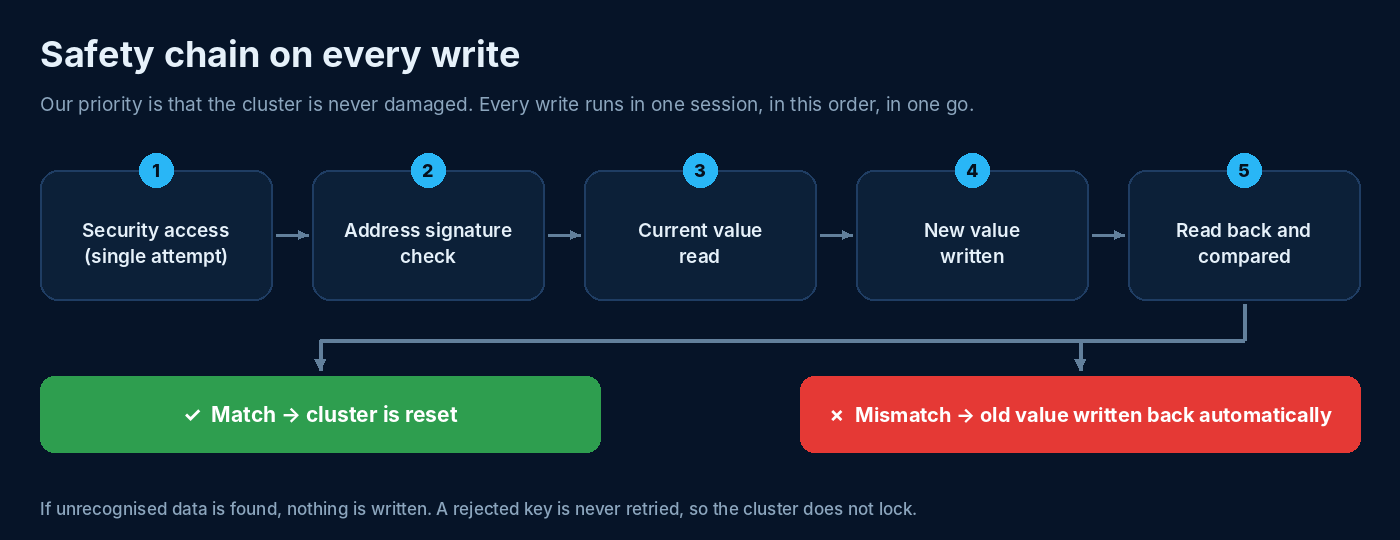
- The security key is tried only once per level. If rejected, the app stops; the cluster does not enter a lockout delay.
- The memory address is verified by a signature before writing. If it does not match, nothing is written.
- The current value is read first; if it is unrecognised, nothing is written.
- The written value is immediately read back and compared. On mismatch the old value is written back automatically in the same session.
- Technical details are saved to a log file; send it via Settings → Share log.
Backups and full restore
Your backups are listed under Settings → Backups with date and SW0. Tapping a backup starts a full restore. This is a repair tool: use it when the cluster does not start, shows nonsense, or broke after a failed operation.
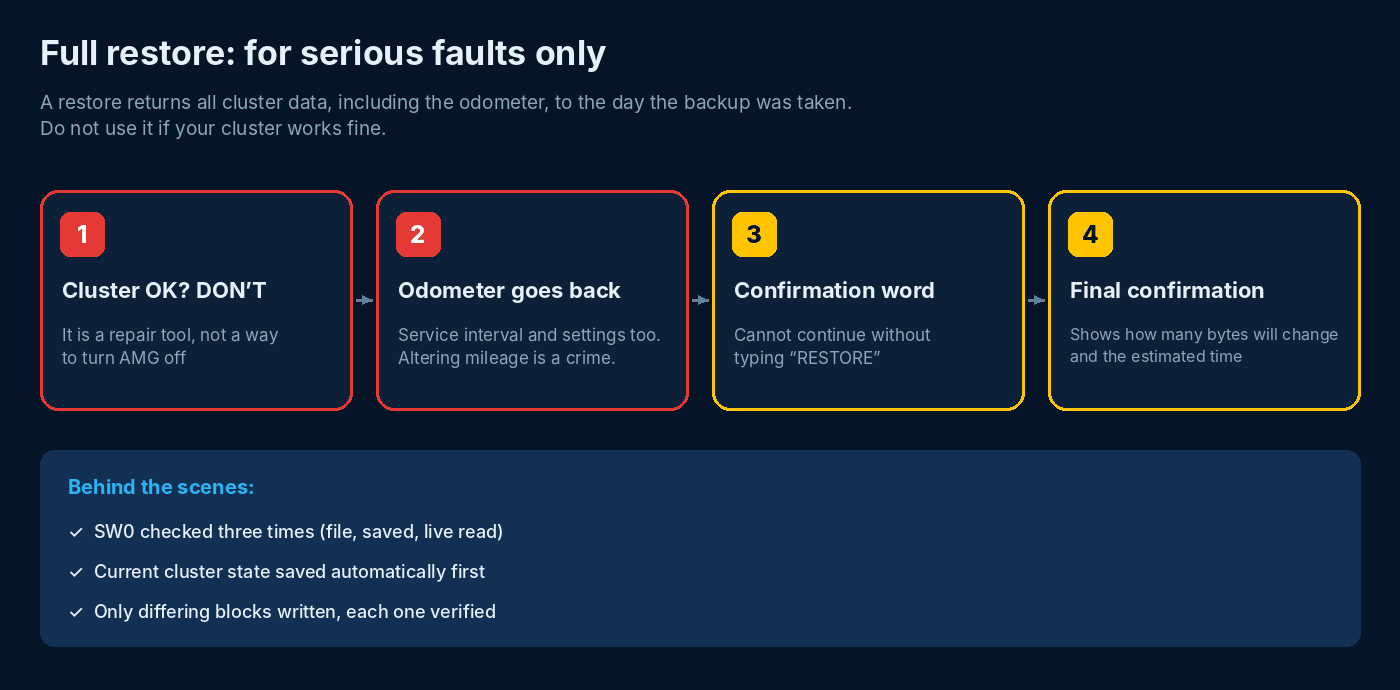
- Warning 1: do not do this if your cluster works fine. To turn the AMG menu off, use Disable AMG on the main screen.
- Warning 2: odometer, service interval and cluster settings revert to the backup date.
- Warning 3: ignition and battery check; type the confirmation word (RESTORE) to continue.
- The app connects, reads SW0 live, compares it with the backup and automatically saves the cluster’s current state.
- Final confirmation shows how many bytes will change and the estimated time. If you confirm, only differing blocks are written, each one is verified, and the cluster restarts.
The odometer reverts to its value on the day the backup was taken. Altering odometer readings is a crime in many countries. This feature is only for recovering a faulty cluster, and all responsibility lies with the user. A backup from another cluster is never written.
Tactrix OpenPort 2.0 (USB)
Beta · read-only
An OpenPort 2.0 can be plugged into the phone with a USB OTG cable. As it is still in testing, it is currently read-only: SW0 detection and full backup. Write operations (AMG on/off, lamp fixes, restore) are disabled for this adapter; use an ELM327 to write.
Free and subscription
Free
- SW0 detection
- Full EEPROM read
- 1 saved backup
Monthly subscription
- AMG on / off, lamp fixes
- Unlimited saved backups
- Full restore
FAQ
The write succeeded but the AMG menu does not appear.
The enabling value depends on the cluster type. Check your type in the TYPE ? guide and try the other option for the same type. If that does not help, send us your SW0, cluster type and log file.
Can it damage the cluster?
The risk is not zero. That is why the app verifies every write, rolls back on mismatch and writes nothing on unrecognised data. A full backup taken before writing lets you restore the cluster in case of a serious problem.
How do I turn the AMG menu off?
Choose Disable AMG in the operation list and press ACTIVATE. The menu bytes return to the factory value (FF). Do not use restore for this.
Does enabling AMG affect the odometer?
No. AMG, CNG and pre-heat operations only change the few bytes involved. Only a full restore returns the odometer to the backup date.
I cannot connect to the Bluetooth adapter.
Pair the adapter in the phone’s Bluetooth settings first, grant the “Nearby devices” permission the app asks for and switch the ignition on. Then select the device in Settings.
SW0 was not found.
You can pick the SP0 number shown in the cluster’s hidden menu from the list. If it is not listed, your cluster may not be supported yet; send us your SW0.
Where are the backup files?
On the phone in Android/data/com.mscsi.amgmenu/files/logs/. This folder is deleted if the app is uninstalled; copy important backups to a computer.
Which languages?
Türkçe, English, Deutsch, Русский. Choose in Settings → Language.
Important
This app writes to the cluster memory. Take a backup and read the warnings before use. The user is responsible for the use of the app. Mercedes-Benz and AMG are registered trademarks of Mercedes-Benz Group AG; this app is not affiliated with or endorsed by Mercedes-Benz.